Install Ollama
Compact relies on Ollama to run Large Language Models locally on your machine, ensuring 100% privacy and no API costs.
Download and install Ollama from their official website:
Download Ollama →Configure CORS (Crucial)
By default, browser extensions are blocked from calling local Ollama instances. You must configure Cross-Origin Resource Sharing (CORS) to allow Compact to communicate with it.
Windows
Run the following command in Command Prompt:
set OLLAMA_ORIGINS="chrome-extension://*" && ollama serve
Or, if you are using PowerShell:
$env:OLLAMA_ORIGINS="chrome-extension://*"; ollama serve
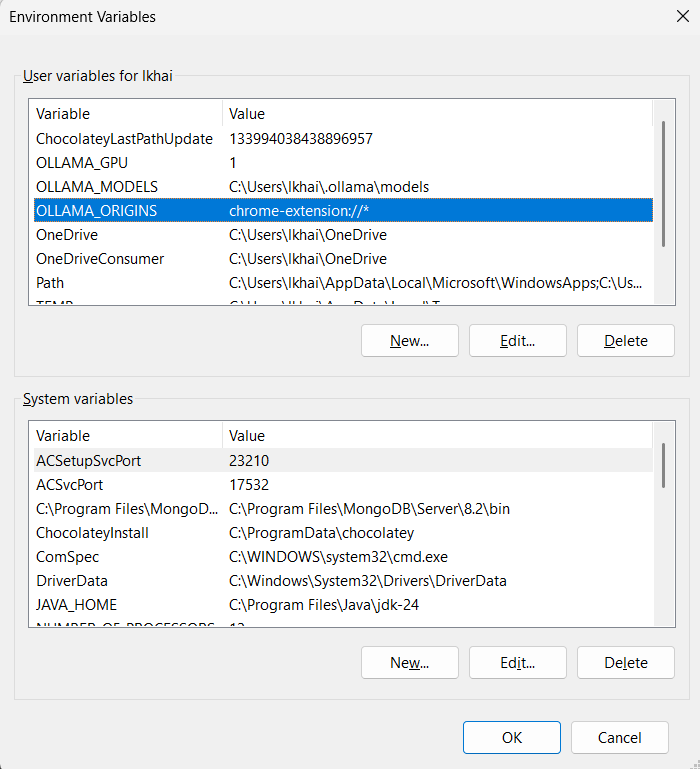
Alternative: Via Environment Variables UI
- Search for "Environment Variables" in the Start menu.
- Add a new System or User variable: Name:
OLLAMA_ORIGINS, Value:chrome-extension://* - Fully exit Ollama from the system tray and restart it.
macOS / Linux
Run the following command in your terminal before starting Ollama:
OLLAMA_ORIGINS="chrome-extension://*" ollama serve
Download a Model
Once Ollama is running, you need to pull an AI model. We recommend llama3.1 for excellent local code reviews, or qwen2.5-coder for specialized coding tasks.
Open your terminal and run:
ollama run llama3.1
Install the Extension
Now you're ready to install Compact! Install it directly from the Edge Add-ons store.
Microsoft Edge Add-ons
Add Compact to your browser with one click.